
Blog
November 2, 2026
Microsoft Azure and Amazon Web Services (AWS) are two of the most widely used cloud platforms, offering businesses a broad range of services for infrastructure, applications, data, security, and more.
For mid-market organizations, moving to the cloud can mean rethinking how systems are hosted, managed, secured, and scaled. With two mature platforms offering many overlapping capabilities, understanding where Azure and AWS differ can help businesses make sense of their options.
Microsoft Azure is Microsoft's cloud platform, offering services for computing, storage, networking, databases, security, AI, and application development. Its integration with Microsoft's broader ecosystem can be particularly relevant for organizations already using Microsoft technologies.
Amazon Web Services (AWS) is Amazon's cloud platform, offering a broad range of infrastructure, development, database, security, AI, and other cloud services. It is widely used for both existing workloads and cloud-native applications.
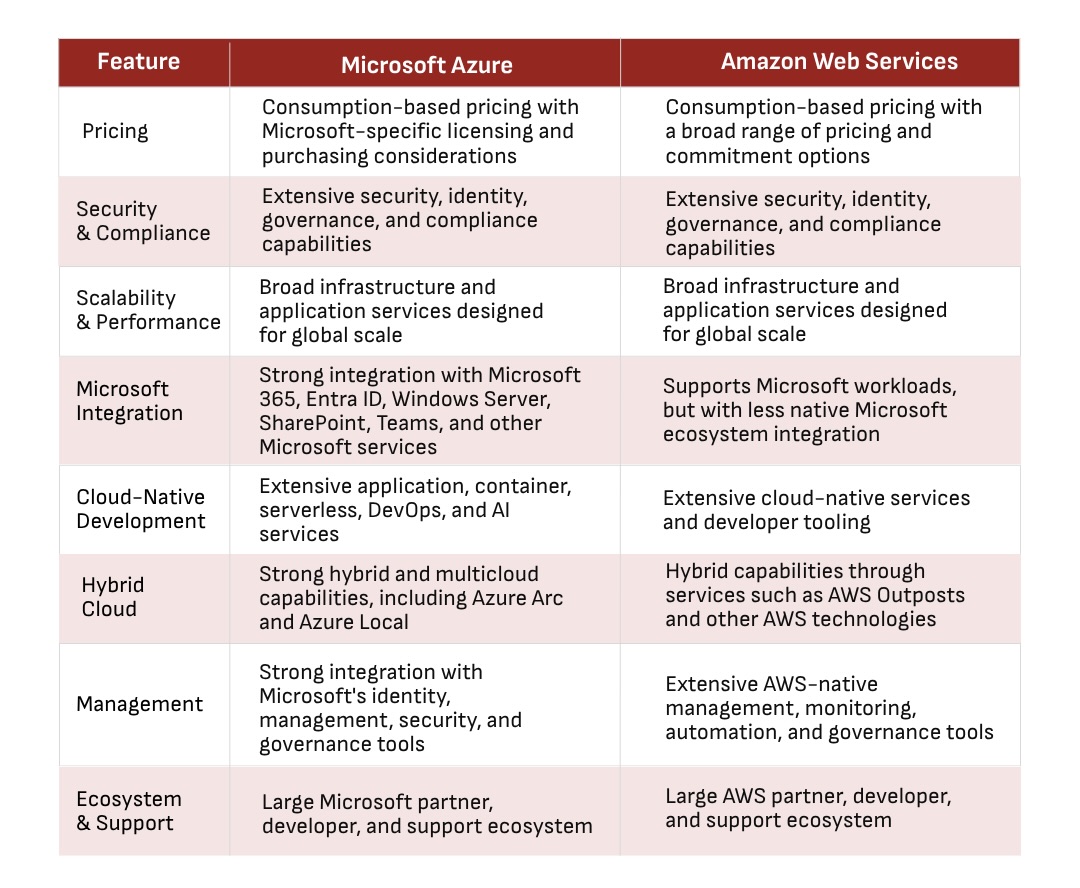
Cloud pricing is rarely as simple as comparing the hourly cost of a virtual machine. Both Azure and AWS use consumption-based pricing models across many services, while discounts, committed-use arrangements, storage, data transfer, licensing, and workload patterns can all affect the final cost.
For a mid-market organization, the more useful approach is to model the cost of its actual workloads. A business moving a few servers to the cloud will have different requirements from one running databases, backup infrastructure, applications, analytics, and development environments.
Existing Microsoft licensing can also affect the Azure cost calculation. Organizations already using Microsoft products should consider how their current licensing agreements and requirements fit into the overall cost of an Azure environment.
The goal is to compare the expected cost of the complete environment rather than individual service prices.
Both Azure and AWS provide extensive security capabilities, including identity and access management, encryption, network security, monitoring, threat detection, and compliance resources. The key consideration is how those capabilities fit into the organization's existing security model.
A business already using Microsoft Entra ID and Microsoft security tools, for example, may be able to build on its existing identity and security environment with Azure. An organization with established AWS expertise may already have processes and tools built around AWS security services.
Neither platform removes the need for proper configuration and governance. Cloud security remains a shared responsibility between the provider and customer, with specific responsibilities depending on the services being used.
For mid-market organizations, the evaluation should therefore look beyond the available features and consider how practical they are to implement, monitor, and manage.
Azure and AWS can support workloads ranging from smaller deployments to highly distributed applications. Both provide infrastructure and services designed to scale as computing, storage, networking, and application requirements grow.
For most mid-market organizations, maximum theoretical scale may not be the deciding factor. A more useful question is whether the platform can support expected growth while remaining practical and cost-effective to manage.
Performance also depends heavily on the workload itself. Application architecture, storage configuration, database design, network latency, geographic location, and resource allocation can all affect how an application performs in the cloud.
Rather than asking which platform is faster overall, organizations should evaluate performance against the requirements of their specific workloads.
An organization's existing Microsoft environment can be an important factor when comparing Azure and AWS.
Azure integrates closely with Microsoft's cloud and identity ecosystem. Microsoft 365 uses Microsoft Entra ID for identity management, while organizations can connect on-premises Active Directory with Entra ID for synchronization and single sign-on.
For businesses already using Microsoft 365, Active Directory, SharePoint, Teams, Windows Server, and other Microsoft applications, this integration can simplify aspects of identity management, administration, and hybrid infrastructure.
AWS can also support Microsoft workloads and technologies, so using Microsoft products does not automatically rule out AWS. However, organizations looking to closely align their cloud infrastructure with their existing Microsoft environment may place greater value on Azure's native integration.
Cloud-native development introduces a different set of considerations. Both Azure and AWS provide services for containers, serverless applications, managed databases, DevOps, APIs, application integration, AI, and other modern development approaches. They also provide virtual networking capabilities, including virtual private cloud environments, that allow organizations to create isolated network environments for their cloud resources.
AWS offers a particularly broad range of cloud services, while Azure provides extensive development and application services within the Microsoft ecosystem.
For organizations building new applications, the decision may depend more on the development team's existing skills and the architecture being considered than on the overall size of either platform's service portfolio.
A team already experienced with AWS may naturally build around AWS services, while a team working extensively with Microsoft development tools, Azure DevOps, .NET, and other Microsoft services may find Azure more familiar.
Many mid-market organizations are not ready—or do not need—to move every workload to the public cloud.
Existing servers, manufacturing systems, specialized applications, regulatory requirements, or other infrastructure may need to remain on-premises while selected workloads move to the cloud. This makes hybrid cloud capabilities an important part of the comparison.
Azure offers technologies such as Azure Arc and Azure Local for managing and extending cloud capabilities across on-premises and other environments. AWS supports hybrid deployments through technologies such as AWS Outposts, which brings AWS infrastructure and services into customer locations.
The important consideration is how these approaches fit the infrastructure already operating in the organization and how much change they would require to the existing environment.
Moving workloads to the cloud does not eliminate the need for ongoing IT management. Resources still need to be monitored, identities and permissions managed, costs reviewed, security controls maintained, and issues investigated.
Both AWS and Azure provide management, monitoring, automation, and governance tools. The practical difference may come down to the skills already available within the organization.
An IT team with strong Microsoft administration experience may find Azure familiar, particularly when managing identities and existing Microsoft infrastructure. A team with established AWS skills may be more comfortable with AWS's management tools and services.
If internal cloud expertise is limited, the organization should also factor in the cost and availability of external expertise when comparing platforms.
Both Azure and AWS have large ecosystems of technology partners, managed service providers, consultants, developers, training resources, documentation, and third-party software.
For a mid-market organization without a large internal cloud engineering team, access to the right expertise can be just as important as the platform itself.
Existing relationships may also play a role. An organization already working with a Microsoft-focused IT provider may have access to Azure expertise, while a business with an established AWS partner or development team may already have the skills needed to operate an AWS environment.
The focus should be on whether the expertise, support, and resources your organization needs are readily available.
The differences between Azure and AWS become most relevant when they are considered in the context of the organization as a whole. Rather than evaluating individual features in isolation, businesses should look at how a platform fits into their existing environment and the direction they want to take it.
For some organizations, the transition to cloud may be primarily about modernizing existing infrastructure. For others, it may be an opportunity to rethink applications, introduce new development capabilities, or build a more flexible hybrid environment. These different objectives can change which platform capabilities matter most.
The practical side of the decision is just as important. Cloud adoption affects how infrastructure is managed, how much internal expertise is required, and what ongoing costs the organization will take on. These considerations should be understood before committing to a platform, rather than addressed after migration.
It's also worth considering whether every workload needs to follow the same approach. Some organizations may benefit from keeping certain systems on-premises while moving others to the cloud, while others may have reasons to use services across more than one cloud environment.
Ultimately, the comparison should be based on the organization's current environment, business requirements, available expertise, and long-term plans—not simply on the number of features offered by either platform.
Choosing a cloud provider is one thing. Building the right cloud environment for your business is another.
At Roca Networks, we provide cloud solutions that help businesses with cloud strategy, migration, infrastructure modernization, backup and disaster recovery, cloud security, and ongoing cloud management. Whether you're considering Azure, AWS, or a hybrid approach, we help you evaluate the options and build a cloud environment around your business needs.
Because the right cloud strategy starts with the business - not the platform.


445 Apple Creek Blvd, Suite 220, Markham, Ontario
Follow Us:


Services
Industries
Roca
Contact
+1 647 476 7680
info@rocanetworks.com
rocanetworks.com
